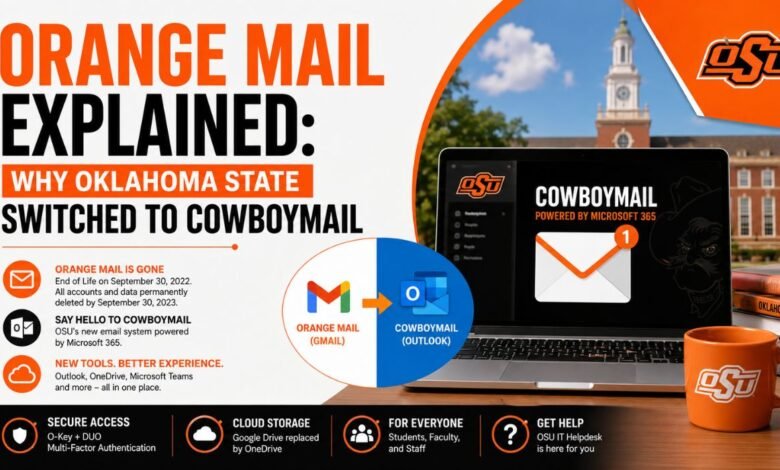
For many years, Orange Mail served as the official email system for students, faculty, and staff at Oklahoma State University. Built on Google’s Gmail platform, the service gave users access to email, Google Drive, and other cloud-based tools connected to their university accounts. Thousands of students relied on Orange Mail every day for coursework, communication, and file storage.
However, major changes arrived when Oklahoma State University decided to retire Orange Mail and move to a new Microsoft-based platform called CowboyMail. The transition marked a significant shift in how the university handled communication, security, and cloud services. While the move created confusion for some users, it also introduced modern collaboration tools and tighter security systems designed for the future of higher education.
Today, many people still search for information about Orange Mail because they want to understand why it ended, what happened to their old accounts, and how CowboyMail works. This guide explains the full story behind the Orange Mail shutdown, the migration to Microsoft services, and what current and former OSU users should know in 2026.
Table of Contents
ToggleQuick Bio Information About Orange Mail
| Information | Details |
|---|---|
| Official Service Name | Orange Mail |
| University | Oklahoma State University |
| Email Domain | @okstate.edu |
| Original Platform | Google Gmail |
| Replacement Service | CowboyMail |
| New Platform Host | Microsoft |
| End Of Life Date | September 30, 2022 |
| Account Removal Date | September 30, 2023 |
| Final Recovery Deadline | December 30, 2023 |
| Cloud Storage Platform | Google Drive |
| Replacement Storage | OneDrive |
| Login Requirement | O-Key Credentials |
| Security System | DUO Multi-Factor Authentication |
| Main User Groups | Students, Faculty, Staff |
| New Email Interface | Outlook |
| Collaboration Platform | Microsoft Teams |
| File Editing Tools | Microsoft 365 Apps |
| Support Department | OSU IT Helpdesk |
| Official Email Address | Remained @okstate.edu |
| Current Email System | CowboyMail |
What Was Orange Mail?
Orange Mail was Oklahoma State University’s official email platform hosted through Google Gmail. The system allowed users to send and receive emails using their university address ending in “@okstate.edu.” Along with Gmail access, users also received Google Drive storage, Google Docs, Sheets, Slides, and other Google Workspace tools.
The platform became widely used because of its simplicity and cloud-based design. Students could easily access assignments, share documents, and communicate with professors from almost any device. Faculty and staff also benefited from collaborative tools that supported remote learning and campus communication.
Orange Mail was more than just an email service. For many students, it became the center of academic life. Important notices, class updates, shared files, and university announcements all flowed through the platform. Because of this, the decision to discontinue Orange Mail became a major technology transition for the university community.
Why Oklahoma State University Ended Orange Mail
The shutdown of Orange Mail reflected broader technology changes happening across universities worldwide. Many educational institutions began reconsidering Google-hosted systems due to rising storage demands, licensing changes, and growing cybersecurity concerns.
Microsoft 365 offered Oklahoma State University a more integrated enterprise environment that connected email, file storage, collaboration, and security under one platform. Services like Outlook, OneDrive, Teams, Word, and Excel could all work together through a single ecosystem.
Security also played a major role in the transition. Universities handle large amounts of sensitive information, including student records and research data. Microsoft’s enterprise-focused tools provided stronger centralized management, identity protection, and multi-factor authentication systems that aligned with modern security standards.
Another important factor involved long-term scalability. As online learning and cloud collaboration continued growing after the pandemic years, universities needed systems capable of supporting larger digital workloads. CowboyMail and Microsoft 365 offered OSU a more unified infrastructure designed for future expansion.
When Orange Mail Was Officially Shut Down
Oklahoma State University announced that Orange Mail officially reached End Of Life on September 30, 2022. While users still had a temporary period to back up important files, the university made it clear that the service would no longer continue as an active platform.
A year later, on September 30, 2023, all Orange Mail accounts and stored content were permanently removed. This included Gmail inboxes, Google Drive files, shared folders, and related Google Workspace content.
The university also established December 30, 2023, as the final recovery deadline. After this date, users could no longer retrieve any deleted Gmail or Google Drive data. For many former students, this became an important reminder about maintaining backups of cloud-based files.
The shutdown timeline remains one of the most searched parts of the Orange Mail story because users still wonder whether old emails or documents can be restored. Unfortunately, OSU confirmed that recovery is no longer possible.
What Is CowboyMail?
CowboyMail is Oklahoma State University’s modern email and collaboration system hosted through Microsoft 365. It replaced Orange Mail as the university’s official communication platform.
The system uses Microsoft Outlook for email services and integrates directly with OneDrive, Teams, Word, Excel, and other Microsoft productivity applications. Unlike the older Google-based environment, CowboyMail focuses heavily on enterprise-level security and unified account management.
Students and staff now use CowboyMail not only for email communication but also for video meetings, file sharing, document editing, and cloud collaboration. This integration became especially important as hybrid learning and remote work continued expanding across universities.
One major advantage of CowboyMail is its connection with Microsoft’s educational ecosystem. Since many workplaces already rely on Microsoft 365, students gain experience using tools that are common in professional environments.
Orange Mail Vs CowboyMail
The transition from Orange Mail to CowboyMail changed several aspects of the university experience. While both systems provided cloud-based communication tools, the underlying platforms worked differently.
Orange Mail depended on Gmail and Google Drive, while CowboyMail uses Outlook and OneDrive. The user interfaces, storage methods, and collaboration tools also differ significantly.
Google Workspace focused heavily on browser-based collaboration. Microsoft 365, meanwhile, combines desktop software, web tools, and enterprise cloud services into one environment. Some users initially found the switch challenging because they were already comfortable with Gmail.
However, many students eventually appreciated features such as tighter Microsoft Teams integration, improved desktop syncing, and advanced security options. Importantly, OSU email addresses themselves did not change during the migration. Users still kept their familiar “@okstate.edu” addresses.
What Happened To Google Drive Files And Gmail Data?
One of the most important aspects of the Orange Mail shutdown involved data deletion. When accounts were removed, users lost access to all stored Gmail messages and Google Drive content connected to their Orange Mail accounts.
This included personal documents, assignments, shared spreadsheets, presentations, photos, and archived emails. Because students often relied heavily on Google Drive storage, the transition created concern among users who had years of academic work stored online.
OSU encouraged everyone to manually download important files before the shutdown deadline. Users were advised to transfer documents either to local computers or to Microsoft OneDrive accounts.
The permanent deletion of Orange Mail data highlights an important lesson about cloud storage. Even trusted services can eventually change, disappear, or migrate. Keeping backups of valuable files remains essential for long-term digital safety.
How To Access CowboyMail
Accessing CowboyMail is relatively simple for active OSU users. Students and staff begin by visiting the CowboyMail login portal and entering their official OSU email address.
After entering credentials, users must complete authentication using their O-Key password. Many accounts also require DUO multi-factor authentication for additional security verification.
Once signed in, users gain access to Outlook email, calendar features, OneDrive storage, and Microsoft collaboration tools. The system works across desktops, smartphones, tablets, and web browsers.
Because Microsoft 365 supports synchronization between devices, users can continue working from almost anywhere. This flexibility became one of the key reasons universities increasingly adopted cloud-based enterprise platforms.
Understanding O-Key Passwords And DUO Authentication
Security became a central focus during the CowboyMail transition. Oklahoma State University requires users to maintain updated O-Key passwords and activate DUO multi-factor authentication.
The O-Key system functions as the primary identity management service for university accounts. Users can reset passwords through the official OSU password management portal whenever necessary.
DUO authentication adds another layer of protection by requiring identity verification through a secondary device, such as a smartphone notification or security code. Even if someone learns a password, they still cannot access the account without completing DUO verification.
Cybersecurity threats targeting universities continue increasing each year. Phishing attacks, credential theft, and ransomware incidents have pushed educational institutions toward stronger identity protection systems. CowboyMail’s security framework reflects this growing need for advanced account protection.
Moving Files From Google Drive To OneDrive
Before Orange Mail data disappeared permanently, OSU advised users to move important files from Google Drive to OneDrive or local storage. This migration process became a major task for many students and faculty members.
The safest approach involved downloading files directly from Google Drive and then uploading them manually into OneDrive folders. Some users also relied on Google Takeout to export large collections of data more efficiently.
OneDrive offers features similar to Google Drive, including cloud storage, file sharing, automatic syncing, and online collaboration. Microsoft also integrates OneDrive closely with Word, Excel, PowerPoint, and Teams.
While the migration process required effort, it helped users become familiar with the Microsoft ecosystem that now powers CowboyMail.
Common Problems During The Transition
Like most major technology migrations, the Orange Mail transition created several challenges. Some users forgot to back up files before deadlines, while others struggled with authentication systems or Outlook settings.
Password issues became especially common. Students returning after long breaks sometimes discovered expired O-Key credentials or inactive DUO authentication setups.
Another challenge involved adapting to Outlook after years of using Gmail. Features such as folder management, email filtering, and interface design felt unfamiliar to some users initially.
OSU IT support played a major role in helping students and staff navigate these problems. The university provided helpdesk support, online instructions, and account management resources throughout the migration process.
Who Can Use CowboyMail Today?
CowboyMail currently serves active Oklahoma State University students, faculty members, and staff. These groups receive official access to university email services and Microsoft 365 tools through their institutional accounts.
Eligibility rules may vary depending on enrollment status, employment status, or graduation timelines. Some former students eventually lose access after leaving the university, while current students maintain active accounts throughout their academic careers.
The system now acts as the university’s primary communication channel. Official announcements, coursework communication, scheduling information, and campus notifications all flow through CowboyMail.
Because universities increasingly rely on centralized digital communication, maintaining active access to CowboyMail remains essential for students and employees alike.
How CowboyMail Connects With Microsoft 365
CowboyMail is part of the broader Microsoft 365 environment, which includes productivity and collaboration tools used by organizations worldwide.
Users can access Outlook for email, Teams for communication, Word for document editing, Excel for spreadsheets, and OneDrive for cloud storage. These applications work together seamlessly across devices.
Microsoft Teams has become especially valuable in educational environments. Professors can host virtual classes, share assignments, and communicate with students through integrated channels.
The Microsoft ecosystem also supports stronger integration between desktop applications and cloud services. This combination allows users to work both online and offline while automatically syncing updates across devices.
Why The Orange Mail Story Still Matters In 2026
Even years after the transition, Orange Mail remains an important topic because it represents a major digital shift within higher education. Many universities continue moving away from older cloud systems toward more centralized enterprise platforms.
The story also highlights how dependent modern education has become on cloud technology. Email systems are no longer simple messaging tools. They now connect learning platforms, cloud storage, collaboration systems, and digital identity management.
For students, the Orange Mail transition offers a reminder about digital responsibility. Backing up files, maintaining password security, and adapting to new technologies are now essential academic skills.
Meanwhile, CowboyMail reflects the growing importance of secure, integrated cloud ecosystems that support modern learning environments.
Final Thoughts
Orange Mail played an important role in Oklahoma State University’s digital history. For years, it helped students, faculty, and staff communicate, collaborate, and store academic files through Google’s cloud platform. However, changing technology needs, growing security demands, and Microsoft 365 integration eventually led OSU to replace Orange Mail with CowboyMail.
Today, CowboyMail serves as the university’s official email and collaboration platform, offering Outlook, OneDrive, Teams, and advanced security systems designed for modern education. While some users still miss the familiarity of Gmail, the transition reflects broader trends shaping universities around the world.
The Orange Mail shutdown also serves as an important lesson about digital preparedness. Cloud platforms may change over time, but keeping backups, protecting accounts, and staying informed about technology transitions can help users avoid losing important information in the future.
FAQs About Orange Mail
Is Orange Mail Still Available In 2026?
No. Orange Mail was permanently discontinued by Oklahoma State University, and all related accounts and data were removed after the shutdown deadlines.
Can Old Orange Mail Emails Be Recovered?
No. OSU confirmed that Gmail and Google Drive data connected to Orange Mail can no longer be recovered after December 30, 2023.
What Replaced Orange Mail?
CowboyMail replaced Orange Mail as Oklahoma State University’s official email platform. It operates through Microsoft 365 services.
Did OSU Email Addresses Change?
No. Users still use email addresses ending in “@okstate.edu.” Only the backend service changed from Google to Microsoft.
What Happened To Google Drive Files?
Google Drive files connected to Orange Mail accounts were permanently deleted after the migration deadlines unless users downloaded or transferred them earlier.
What Is CowboyMail Used For?
CowboyMail provides email, cloud storage, collaboration tools, calendars, and Microsoft 365 applications for students, faculty, and staff.
Why Did OSU Switch From Gmail To Microsoft?
The university likely moved to Microsoft for better enterprise integration, stronger security systems, centralized management, and long-term scalability.
Does CowboyMail Use Outlook?
Yes. CowboyMail uses Microsoft Outlook as its primary email interface and communication platform.
Please Read Also: Who Is Lia Gerardini? Inside Vince Neil’s Former Marriage
 AdminMay 13, 2026