Study Island has become one of the most recognized online learning platforms used in K–12 education. Schools across the United States use it to support classroom instruction, improve test preparation, and help students master state learning standards. Even though many newer educational tools have entered the market, Study Island continues to remain popular because of its practical approach to learning and assessment.
Modern classrooms depend heavily on digital tools that can help teachers save time while giving students more personalized instruction. Study Island was designed with that goal in mind. The platform combines lessons, quizzes, practice sessions, and reporting tools into one system that teachers can manage easily. Students can work independently, complete assignments online, and receive instant feedback that helps them understand mistakes quickly.
One reason many schools continue using Study Island in 2026 is its strong focus on standards-based learning. Instead of offering random educational games or unrelated activities, the platform connects lessons directly to state academic standards. This makes it especially useful for test preparation and classroom reinforcement.
The platform may not have the most modern design compared to some newer competitors, but it remains valuable because of its detailed reporting tools, flexible assignments, and wide subject coverage. For teachers, administrators, parents, and tutoring programs, Study Island provides a structured learning experience that supports both classroom and remote education.
Quick Bio Information About Study Island
| Feature | Details |
|---|---|
| Platform Name | Study Island |
| Platform Type | Online Learning And Assessment Tool |
| Main Audience | K–12 Students And Schools |
| Founded | Early 2000s |
| Parent Company | Edmentum |
| Primary Purpose | Standards-Based Learning |
| Subjects Covered | Math, Reading, Science, Social Studies |
| Learning Style | Interactive Practice And Assessments |
| Teacher Dashboard | Sensei Dashboard |
| Reporting Features | Real-Time Progress Tracking |
| Homework Support | Yes |
| Remote Learning Support | Yes |
| Device Compatibility | Computers And Tablets |
| Browser Access | Web-Based Platform |
| Assessment Tools | Quizzes And Built-In Tests |
| Personalized Learning | Available Through Data Tracking |
| Integration Support | Clever, ClassLink, MAP Growth |
| Pricing Style | Custom School Pricing |
| Best For | Schools And Districts |
| Focus Area | State Standards And Test Preparation |
What Is Study Island And How Does It Work?
Study Island is a web-based learning platform designed for students from kindergarten through high school. It allows schools and teachers to assign online lessons, quizzes, and assessments based on state educational standards. Students log into the system through a browser and complete activities related to subjects such as math, reading, science, and social studies.
The platform works by combining instructional content with continuous practice. Teachers can create assignments, monitor progress, and view performance reports in real time. Students complete questions and activities online, and the system automatically grades most assignments instantly.
One of the most useful parts of Study Island is its standards alignment. Schools can choose state-specific learning objectives, helping teachers focus directly on curriculum goals. This makes the platform especially valuable during testing seasons or when schools need intervention support for struggling students.
Study Island also supports flexible learning environments. It can be used during classroom instruction, homework sessions, after-school tutoring, summer learning programs, and remote education. Since it is cloud-based, students can access assignments from school or home using laptops, desktops, or tablets.
Key Features Of Study Island
One reason Study Island remains relevant is its collection of classroom-focused features. The platform was built to simplify learning management while helping teachers monitor academic progress efficiently.
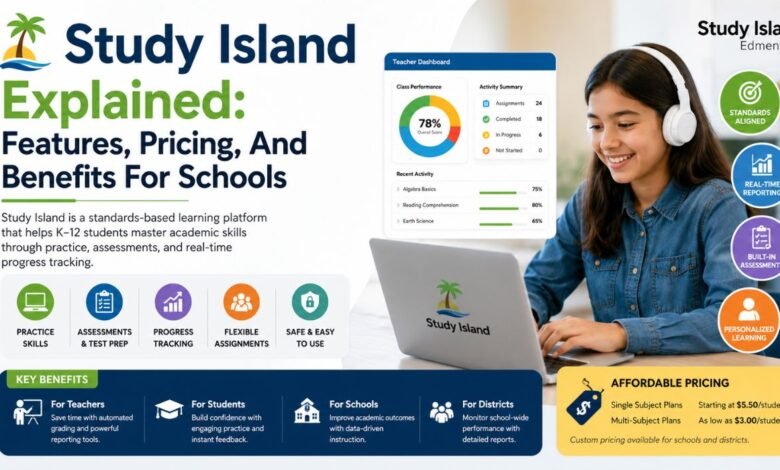
The Teacher Dashboard, known as Sensei, gives educators a complete overview of student activity. Teachers can assign lessons, track completion rates, review assessment scores, and identify learning gaps quickly. This central dashboard saves time and helps instructors make informed decisions about classroom instruction.
Another major feature is customizable assignments. Teachers can create targeted practice sessions based on student needs. If a class struggles with fractions or reading comprehension, assignments can focus directly on those topics.
Study Island also includes built-in tests and group sessions. Teachers can create assessments for homework, classroom review, or benchmark testing. Group sessions allow teachers to guide students through activities together, which can improve classroom engagement.
The platform’s real-time reporting tools are especially important for schools focused on data-driven instruction. Administrators and teachers can view reports at student, classroom, school, or district level, helping them measure academic performance over time.
Subjects And Grade Levels Covered By Study Island
Study Island supports a broad range of academic subjects for students in kindergarten through grade 12. This wide coverage makes it useful for elementary schools, middle schools, and high schools alike.
Math is one of the platform’s strongest areas. Students can practice arithmetic, algebra, geometry, problem-solving, and advanced mathematical concepts through interactive exercises and assessments.
Reading and Language Arts sections focus on vocabulary, grammar, reading comprehension, writing skills, and literary analysis. These lessons help students strengthen communication and critical thinking abilities.
Science content includes life science, earth science, biology, chemistry, and physics topics depending on grade level. Social studies lessons cover history, geography, government, and economics.
Because Study Island aligns with state learning standards, schools can adapt the platform to match local curriculum requirements. This standards-based structure is one of the biggest reasons schools continue to use the software for classroom support and standardized test preparation.
Study Island Pricing And Subscription Plans
Study Island pricing is generally customized for schools and districts rather than individual consumers. The company offers several pricing models depending on subject access, student numbers, and institutional requirements.
Single-subject plans often start around $5.50 per student, while multi-subject plans can reduce costs to approximately $3.00 per student. However, final pricing depends on the size of the school or district and the specific package selected.
Many districts negotiate customized contracts that include integrations, reporting tools, teacher support, and training services. Because of this, schools typically request a direct quote from the company before purchasing.
One challenge for some buyers is limited public pricing transparency. Smaller schools or tutoring programs may need detailed consultations before understanding the full cost structure. Still, many educators believe the platform’s reporting tools and standards-based content justify the investment.
As online learning continues growing in 2026, schools increasingly compare Study Island pricing with other platforms such as IXL and Khan Academy before making decisions.
Benefits Of Study Island For Teachers
Teachers often choose Study Island because it reduces administrative work while improving classroom organization. Instead of grading every worksheet manually, educators can rely on automated assessments and instant reporting.
The platform helps teachers identify student weaknesses quickly. If several students struggle with a specific skill, teachers can assign targeted practice activities immediately. This supports differentiated instruction and allows classrooms to move at a more personalized pace.
Study Island is also valuable during test preparation seasons. Teachers can assign practice questions aligned with state exams, helping students become more comfortable with testing formats and academic expectations.
Another advantage is progress tracking. Teachers can monitor assignment completion, quiz scores, and long-term growth without maintaining separate spreadsheets or paper records. These reporting tools help educators communicate more effectively with parents and school administrators.
The ability to combine classroom instruction with digital assignments also makes hybrid and remote learning easier to manage.
Benefits Of Study Island For Students
For students, Study Island provides structured academic practice in an accessible digital format. Instead of relying only on textbooks or worksheets, learners can interact with online lessons and receive instant feedback.
Immediate scoring helps students understand mistakes faster. If a student answers incorrectly, the platform often provides explanations or opportunities for additional practice. This creates a more supportive learning environment.
The platform’s self-paced structure is another major benefit. Students can complete assignments at their own speed, revisit difficult concepts, and practice skills repeatedly until they improve.
Study Island also supports independent learning habits. Since assignments are available online, students can continue learning outside regular classroom hours. This flexibility became especially important during remote and hybrid learning periods.
Although the platform is more academically focused than game-based learning apps, many students still appreciate its clear structure and goal-oriented approach.
Integrations And Compatibility
Study Island supports integration with several major educational platforms, helping schools connect assessment data and simplify account access.
One important integration is with NWEA MAP Growth. MAP assessment scores can connect directly with Study Island to create personalized learning pathways. Teachers can use assessment data to assign targeted practice automatically.
The platform also integrates with Renaissance Star Assessments, helping schools combine multiple academic data sources into one learning system.
Single sign-on compatibility with Clever and ClassLink simplifies student login processes. This reduces technical issues and makes classroom management easier.
Study Island works on most modern browsers and supports learning across computers, laptops, and tablets. This compatibility helps schools maintain flexible learning environments for both classroom and home use.
Pros And Cons Of Study Island
Study Island offers several advantages that continue to attract schools and districts. Its strongest feature is standards-based learning aligned with state educational goals. Teachers also value the detailed reporting tools, assignment flexibility, and assessment features.
The platform works especially well for intervention programs, homework reinforcement, and standardized test preparation. Its data-driven approach allows educators to monitor progress and adjust instruction efficiently.
However, the software also has limitations. Many users mention that the interface feels outdated compared to newer educational platforms. Some students may find the practice activities repetitive over time.
User reviews are mixed, with some educators praising the reporting features while others criticize navigation and engagement design. Schools looking for highly gamified learning experiences may prefer alternatives with more interactive visuals and rewards.
Despite these drawbacks, Study Island remains a reliable option for schools focused on structured academic improvement.
Study Island Vs Other Learning Platforms
The educational technology market has become highly competitive, and schools often compare Study Island with several major platforms.
IXL is known for skill-based practice and detailed analytics. It offers a more modern interface and strong adaptive learning features, though some students find its repetitive questioning style challenging.
Khan Academy provides free educational content and video lessons. While it is highly accessible, it may not offer the same level of school-wide reporting and standards alignment as Study Island.
Edmentum focuses on broader digital curriculum solutions and virtual learning support. Since Edmentum owns Study Island, the two platforms can complement each other within school systems.
Study Island stands out mainly because of its assessment structure, reporting capabilities, and state-aligned content rather than flashy design or entertainment features.
Who Should Use Study Island?
Study Island works best for K–12 schools seeking structured academic support and assessment tools. Districts focused on standards mastery and data-driven instruction often benefit most from the platform.
Elementary schools can use Study Island for foundational skill development in reading and math, while middle and high schools often rely on it for benchmark testing and exam preparation.
Tutoring centers and after-school programs may also find the platform useful because of its organized assignments and progress tracking features.
Schools operating hybrid or remote learning programs can benefit from the platform’s cloud-based access and flexible assignment management. Since students can complete work from home, teachers maintain better continuity during interruptions to traditional classroom schedules.
Parents looking for independent home learning tools may also appreciate the platform’s structured educational content.
Real Classroom Uses Of Study Island
Many schools use Study Island in multiple ways throughout the academic year. Teachers often assign short practice sessions as homework reinforcement after classroom lessons.
The platform is also commonly used before standardized testing periods. Students can complete state-aligned practice questions that mirror real testing formats, helping reduce test anxiety and improve confidence.
Intervention programs frequently rely on Study Island to help struggling students strengthen weak academic areas. Because teachers can target specific skills, the platform supports focused remediation.
Summer learning programs and after-school tutoring sessions also benefit from Study Island’s flexible online access. Students can continue practicing skills even outside normal school schedules.
In remote learning settings, teachers can monitor participation and progress through the reporting dashboard, helping maintain accountability even when students are learning from home.
Tips For Getting The Most Out Of Study Island
Schools using Study Island successfully often combine the platform with classroom instruction rather than relying on it alone. Teachers who connect digital assignments directly to lessons usually see stronger engagement and better academic results.
Regular progress monitoring is important. Teachers should review reports frequently to identify patterns and adjust instruction when needed.
Students benefit most when assignments are targeted instead of overly broad. Short, focused practice sessions tend to improve retention and reduce frustration.
Encouraging students to review explanations after incorrect answers can also strengthen long-term understanding. Parents can support learning by checking assignment completion and helping students maintain consistent study habits.
Professional development and teacher training may further improve how schools use the platform effectively.
Final Thoughts
Study Island continues to play an important role in digital education because of its strong standards-based learning system, detailed reporting tools, and flexible classroom support. While its design may not feel as modern as some newer educational platforms, the software still delivers meaningful value for schools focused on academic performance and assessment tracking.
Teachers benefit from easier assignment management and real-time reporting, while students gain structured practice opportunities that support long-term learning growth. The platform’s compatibility with major educational systems and its support for both classroom and remote learning environments make it even more useful in 2026.
For schools searching for a practical and reliable K–12 learning platform, Study Island remains a solid option worth considering. Its focus on standards alignment, assessment preparation, and personalized instruction continues to make it a trusted tool for educators looking to improve student outcomes in a structured and measurable way.
Frequently Asked Questions About Study Island
Is Study Island Free?
Study Island is not fully free. Schools and districts typically purchase subscriptions based on student numbers and subject access. Pricing varies depending on the selected plan.
What Grades Use Study Island?
The platform supports students from kindergarten through grade 12, making it suitable for elementary, middle, and high schools.
Does Study Island Help With Test Preparation?
Yes. Many schools use Study Island for standardized test preparation because its lessons align with state learning standards and testing objectives.
Can Students Use Study Island At Home?
Students can access Study Island from home using internet-connected devices such as laptops, desktops, and tablets.
What Subjects Are Included In Study Island?
Study Island includes math, reading, language arts, science, and social studies content for various grade levels.
Does Study Island Track Student Progress?
The platform provides detailed progress reports that help teachers monitor assignment completion, quiz performance, and academic growth.
Is Study Island Good For Remote Learning?
Yes. Since the platform is web-based, teachers can assign work and monitor students remotely, making it useful for hybrid and online learning environments.
Can Study Island Integrate With Other School Systems?
Study Island integrates with systems like MAP Growth, Clever, ClassLink, and Renaissance Star Assessments for smoother data management and login access.
Please Read Also: Kia Finance Explained: Simple Guide To PCP, PML, And Leasing Options