Classrooms today are very different from what they were even a decade ago. Students are surrounded by technology, fast-paced content, and interactive experiences. Because of this, traditional teaching methods alone often struggle to keep attention and interest. This is where gamified learning becomes powerful. By turning lessons into interactive experiences, teachers can make learning feel exciting rather than forced. One platform that has quickly gained attention in this space is Gimkit, a tool designed to transform quizzes into engaging games. Built with simplicity and student experience in mind, Gimkit offers a refreshing approach that allows students to learn actively while teachers gain valuable insights. This guide explores everything you need to know about Gimkit and how it can make teaching more effective and enjoyable.
Quick Bio Information About Gimkit
Gimkit Name: Gimkit
Platform Type: Game-Based Learning Tool
Primary Use: Quiz-Based Learning
Created By: High School Student
Launch Year: 2017
Target Audience: K–12 Education
Access Devices: Phones, Tablets, Laptops
Game Modes: Multiple Interactive Modes
Assignment Feature: Yes
Live Gameplay: Yes
Student Collaboration: Supported
Customization Options: Extensive
Analytics Dashboard: Available
Pricing Model: Free And Paid Plans
Content Creation: Teacher And Student Input
Integration Options: Google Accounts
Learning Style Support: Visual And Interactive
Update Frequency: Regular Feature Updates
What Is Gimkit?
Gimkit is a game-based learning platform that uses quizzes to help students learn in an interactive and rewarding way. Unlike traditional quiz tools, Gimkit introduces a system where students earn virtual currency for correct answers. This currency can then be used to purchase upgrades, creating a strategy-based experience that keeps learners engaged for longer periods. The platform was originally created by a high school student, which explains its student-friendly design and intuitive interface. Gimkit supports both live classroom play and independent assignments, making it flexible enough for different teaching styles. Its simplicity ensures that even first-time users can quickly understand how it works without needing extensive training.
How Gimkit Works In The Classroom
Using Gimkit in the classroom is straightforward and efficient. Teachers begin by creating a “Kit,” which is essentially a quiz. These kits can be built from scratch, imported from other platforms, or selected from existing libraries. Once the kit is ready, teachers launch a game and share a join code with students. Students can access the game using their devices, such as smartphones, tablets, or laptops. During gameplay, students answer questions and earn virtual money for correct responses. They can reinvest this money into upgrades that increase their scoring potential. This adds a layer of strategy, making the experience more dynamic than standard quizzes. Teachers can run games live or assign them as homework, allowing flexibility in how lessons are delivered.
How Teachers Can Use Gimkit For Teaching
Gimkit fits naturally into many teaching scenarios. Teachers often use it as a review tool before exams, helping students reinforce what they have learned in a fun way. It can also serve as a formative assessment tool, allowing teachers to gauge understanding before starting a new topic. Homework assignments become more engaging when students can complete them at their own pace using Gimkit’s assignment mode. Group activities are another effective use, where students collaborate or compete in teams. This not only builds knowledge but also encourages communication and teamwork. Because Gimkit reduces the need for constant supervision, teachers can spend more time supporting individual students who need extra help.
Key Features Of Gimkit That Make It Unique
What sets Gimkit apart from other learning tools is its combination of simplicity and depth. One standout feature is KitCollab, which allows students to contribute questions to a quiz. This encourages deeper thinking and active participation. Another key feature is the in-game currency system, which rewards correct answers and introduces strategic decision-making. Gimkit also offers multiple game modes, each with unique rules and challenges that keep gameplay fresh. Teachers benefit from a detailed analytics dashboard that tracks student performance, helping them identify strengths and areas for improvement. The platform’s customization options allow educators to tailor content to their specific teaching goals.
What’s New In Gimkit In 2025


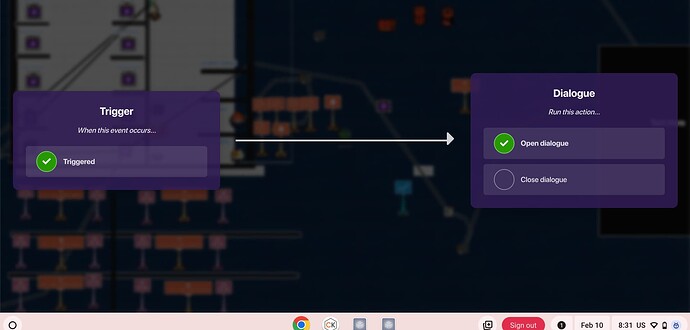
Gimkit continues to evolve with regular updates that enhance both learning and gameplay. Recent additions include a platforming mode that introduces movement-based interaction, making lessons feel more like video games. The Pixelator tool allows teachers to create visual content, adding another layer of creativity to quizzes. Storytelling features such as character dialogue help build narrative-driven learning experiences. New maps, terrains, and customizable elements give teachers more control over how games look and feel. These updates show Gimkit’s commitment to staying relevant and engaging, ensuring that both teachers and students continue to benefit from new ideas.
Benefits Of Using Gimkit For Students And Teachers
Gimkit offers clear advantages for both students and educators. For students, the platform makes learning enjoyable and interactive, which increases motivation and participation. The reward system encourages persistence, while self-paced assignments support independent learning. For teachers, Gimkit simplifies assessment by providing real-time data and automatic grading. It also saves time by reducing the need for manual quiz checking. Perhaps most importantly, it creates a classroom environment where learning feels like an activity students want to take part in rather than something they are required to do.
Pros And Cons Of Gimkit
Like any educational tool, Gimkit has both strengths and limitations. One of its biggest advantages is its ability to engage students through game mechanics. It is easy to set up and works across multiple devices, making it accessible for most classrooms. However, the free version has limitations, including a cap on the number of students per game. It also requires reliable internet access, which may not be available in all settings. Additionally, while the game elements are engaging, they can sometimes distract from learning if not managed carefully. Understanding these factors helps teachers use Gimkit more effectively.
Gimkit Pricing And Plans
Gimkit offers a flexible pricing structure to suit different needs. The free version provides basic access but limits the number of participants in a game. The Pro version unlocks additional features such as unlimited players, assignments, and multimedia support. Schools and districts can also choose larger plans that allow multiple teachers to use the platform. For many educators, the paid version is worth considering because of the added flexibility and functionality it provides. However, even the free version can be useful when used creatively.
Gimkit Vs Other Learning Tools
When compared to tools like Kahoot! and Quizizz, Gimkit stands out for its strategic gameplay and reward system. While Kahoot focuses on fast-paced quizzes and Quizizz emphasizes self-paced learning, Gimkit combines both approaches with an added layer of decision-making. Students are not just answering questions; they are also managing resources and planning strategies. This makes the experience more immersive and engaging. Each platform has its strengths, but Gimkit offers a unique blend that appeals to many teachers.
Tips To Use Gimkit Effectively In Your Classroom
To get the most out of Gimkit, teachers should focus on thoughtful implementation. Using KitCollab can encourage students to think critically by creating their own questions. Mixing live games with assignments helps maintain variety and keeps students interested. Teachers can also use data from the platform to identify areas where students need extra support. Encouraging teamwork during gameplay can build collaboration skills while making lessons more interactive. By experimenting with different game modes and strategies, educators can discover what works best for their classroom.
Real Classroom Examples And Practical Use
In real classrooms, Gimkit is often used in creative ways that go beyond simple quizzes. Some teachers use it as a warm-up activity to review previous lessons, while others integrate it into full lesson plans. In language classes, it can be used to practice vocabulary, while in science classes, it can reinforce key concepts. Teachers have also used Gimkit for revision sessions before exams, helping students feel more confident and prepared. These practical examples show how versatile the platform can be when used thoughtfully.
How Gimkit Supports Different Learning Styles
One of the strengths of Gimkit is its ability to support different types of learners. Visual learners benefit from colorful interfaces and interactive elements, while auditory learners can engage with multimedia content. Kinesthetic learners enjoy the active participation involved in gameplay. The platform’s flexibility allows teachers to adapt it to different needs, ensuring that all students can benefit. By offering multiple ways to interact with content, Gimkit helps create a more inclusive learning environment.
Challenges Teachers May Face With Gimkit
While Gimkit is easy to use, some challenges may arise. Teachers new to gamified learning may need time to understand how to balance fun and educational value. Managing classroom behavior during competitive games can also require careful planning. Technical issues, such as connectivity problems, may occasionally disrupt gameplay. However, with proper preparation and clear guidelines, these challenges can be minimized. Over time, most teachers find that the benefits of using Gimkit outweigh these initial difficulties.
The Future Of Gimkit In Education
As education continues to evolve, platforms like Gimkit are likely to play an increasingly important role. The focus on engagement, personalization, and data-driven insights aligns with modern teaching practices. Future updates may include even more advanced features, such as deeper integration with learning management systems and enhanced analytics. As teachers look for new ways to connect with students, tools like Gimkit will continue to provide valuable solutions.
FAQs About Gimkit
What Is Gimkit Used For
Gimkit is used to make learning interactive through quiz-based games that engage students and help teachers assess understanding.
Is Gimkit Free To Use
Yes, Gimkit offers a free version, but it has limitations. Paid plans provide additional features and flexibility.
Can Students Use Gimkit At Home
Students can access Gimkit from home through assignments or game codes provided by teachers.
Is Gimkit Suitable For All Grade Levels
Gimkit is primarily designed for K–12 students, but it can be adapted for different age groups.
Does Gimkit Work On Mobile Devices
Yes, Gimkit works on smartphones, tablets, and computers, making it accessible for most students.
How Does Gimkit Help Teachers
It provides real-time data, automatic grading, and engaging activities that make teaching more efficient.
Please People Read Also: Can Conjoined Twins Get Pregnant? Everything You Need to Know